Create a multi-output device
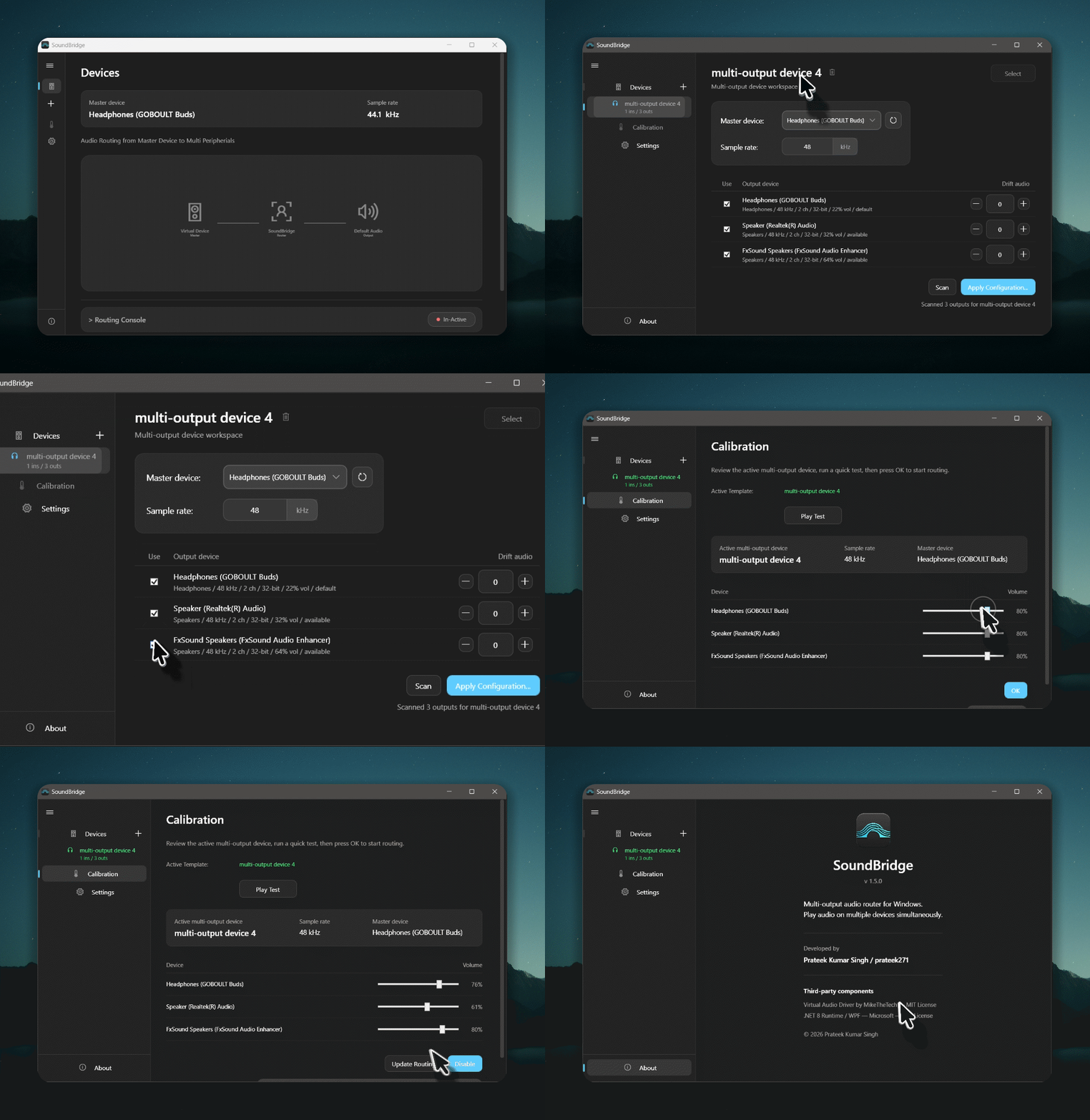
Pick a master device and tick the outputs you want. Use Drift audio to nudge any output that runs late, then click Apply Configuration.
HeadphonesSpeakerFxSound Speakers
SoundBridge is a multi-output audio router for Windows. Send one source to headphones, speakers and more, with separate volume and drift control for each.
Try it: tick an output, press + or −, drag a volume slider, or click Active. All three windows stay in sync.
Pick a master device and tick the outputs you want. Use Drift audio to nudge any output that runs late, then click Apply Configuration.
Click Play Test, set the volume for each output, and press OK to start routing.
The Routing Console shows live status, volume and delay for every output.
ActiveUse Update Routing to apply changes, or Disable to stop.
Keep the headphones quiet and the speakers loud. Every output has its own level.
Shift one output earlier or later so every device stays in sync.
Your multi-output devices are saved and restored the next time you open the app.
Start with Windows and minimize to the system tray when you close the window.
A WPF interface, a native C++17 audio core and an MSI installer.